|
BadPixelMap/Dark Frame |
  
|
| Show/Hide Hidden Text |
|
BadPixelMap/Dark Frame |
|
| Show/Hide Hidden Text |
The application provides a mechanism to create a dark frames and bad pixel maps for the connected camera by taking and evaluating images of the covered camera. The dark frame / bad pixel map can then be used to remove / repair hot and cold pixel of acquired images. In general it is not recommended to use both dark frame subtraction as well as a bad pixel map at the same time.
Instructions on how to create a dark frame / bad pixel map file within AllSkEye can be found here: Bad Pixel Map / Dark Frame Creation
Dark Frame Correction
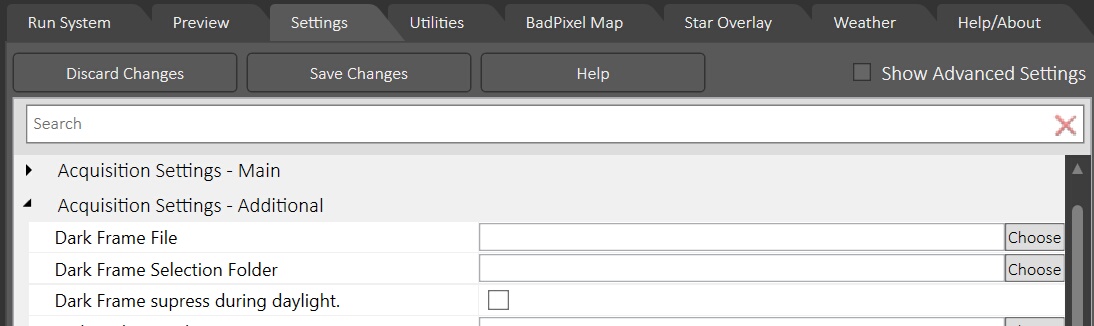
To use a dark frame the application provides two options:
| • | Specify a single FITS dark frame file |
| • | Specify a folder which contains multiple FITS dark frame files with varying exposure times. The app will choose the file with the nearest exposure time to the actual exposure time when the picture is taken. |
| • | There is also an option to suppress the dark frame subtraction during daylight hours |
Dark Frame Selection Folder File Naming:
To ensure that AllSkEye can select the best dark frame for the current exposure time the file names of all the dark frame FITS files in the selected folder must follow the following convention:
| • | The file name must be the exposure time of the frame in milliseconds. No other letters or characters are allowed. |
Examples:
| • | Dark frame for 1s exposures --> 1000.fit |
| • | Dark frame for 5s exposures --> 5000.fit |
(Please note that the file extension .fit can differ, depending on your app settings e.g. .fit, .fits, .fts)
Bad Pixel Maps
When creating a bad pixel map the app will attempt to identify defective pixel and store this information in a bad pixel map .bpm file. When an acquisition is taken, pixel values in positions that are marked in bad pixel map will be discarded and interpolated instead. Full details on bad pixel maps can be found here: Bad Pixel Map / Dark Frame Creation